

A Complete Guide to Choosing the Right Field Service Management Software
What are Field Service Management Softwares?
Think about the last package you ordered online. You probably received updates when it was shipped, out for delivery, and when it arrived. You may have even received an attached photo confirming delivery! Behind those updates is a system that keeps office staff, field workers, and customers connected in real time.
Field service management (FSM) software helps organizations plan, coordinate, execute, and track work performed outside of the office. Industries such as construction, utilities, logistics, landscaping, and maintenance all share one common challenge: Unlike office-based businesses, their work takes place across constantly changing environments. Information needs to be easily captured on-site, while managers back at the office need real-time visibility into job progress. This creates operational challenges that regular business software isn’t designed to handle.
As a result of this unique setup, field workers need mobile-friendly tools to quickly scan barcodes, take photos, complete checklists, and record information. Office teams need accurate, up-to-date information to coordinate operations, and customers expect timely updates on job progress. Maintaining a complete history of every job, including timestamps, photos, approvals, and other information, is also essential for resolving disputes, meeting compliance requirements, and improving future operations.

5 Features Every Field Service Management Software Should Have
We’ve compiled the top 5 features that every field service management software should have in order to meet the unique needs of field service businesses:
1. Real-Time Updates
Imagine a maintenance crew finishes a repair, but the office doesn’t find out until hours later when they return to submit paperwork. This can really hinder productivity and cause delays. In some cases, customers may even be left wondering when the work will be completed. For businesses managing multiple field workers and job sites, these communication gaps quickly become costly.
Real-time updates keep everyone on the same page. As field workers complete tasks, upload photos, or report unexpected issues on the field, office staff can instantly monitor job progress, reassign resources, and respond to changing conditions. Customers also benefit from greater transparency through timely notifications, whether a technician is on the way, work has been completed, or a photo has been sent to confirm the finished job.
To make this possible, field service management software should be based online, allowing field workers and office teams to access and update the same information regardless of their physical location. Instead of waiting for paperwork, phone calls, or end-of-day reports, everyone has access to the latest information as soon as it’s recorded.
2. Faster Approvals, Fewer Bottlenecks
Many field operations involve more than simply completing a task. Inspection reports may need a supervisor’s sign-off, safety incidents may require management review, and completed jobs often need to be approved before invoices can be issued or customers notified. When these approvals rely on emails, phone calls, or paper forms, work can easily slow down while everyone waits for the next person to respond.
A good field service management system keeps work moving with built-in approval workflows and clear status tracking. As soon as a field worker uploads a finished job, the appropriate manager is automatically notified to review it. Everyone can immediately see whether the job is in progress, awaiting review, approved, or completed, eliminating the need to chase updates or wonder who is responsible for the next step.
This visibility not only speeds up operations but also reduces errors and improves accountability. Managers can quickly identify jobs that have been sitting in the same stage for too long, allowing teams to resolve delays before they create a bottleneck for operations.

3. Faster Data Capture with Barcodes and QR Codes
Field workers often need to identify or verify assets, update work orders, or fill out forms while they’re on-site. Manually typing serial numbers, asset IDs, or job information can slow down the work and increase the risk of data entry errors, especially when employees are working outdoors or moving quickly between locations.
Barcode and QR code scanning make data capture significantly faster and more accurate. Instead of searching for the correct form or manually entering information, workers can simply scan a code using their mobile devices to instantly access what they need. Whether it’s identifying an asset or launching a specific form, scanning reduces typing, minimizes mistakes, and ensures information is captured quickly and accurately.
4. Capture Field Conditions Automatically
Picture this: You enter the date and address for a job, and the system automatically populates relevant site conditions such as mileage (based on travel routes) and forecasted weather conditions. Small automations like these may only save a few minutes per job, but can significantly reduce administrative work across hundreds or thousands of field visits.
For many field operations, weather is more than just useful tracking information; it impacts whether work can be performed safely and effectively. Industries such as vegetation management, construction, and utility maintenance often rely on favorable weather conditions before crews can begin work. A field service management system that automatically retrieves this information helps teams plan more efficiently, avoid unnecessary site visits, and maintain a more complete record of the conditions under which work was performed.
5. Complete Audit Trails
It is important for businesses to keep a complete and traceable record of jobs. Whether responding to customer disputes, investigating safety incidents, or demonstrating regulatory compliance, having access to detailed historical information can save valuable time and reduce risks.
A good field service management software should maintain an audit trail of every job, including time stamps, status changes, approvals, photos, notes, and the users who made each update. This creates a reliable record of what happened, when it happened, and who was involved, giving organizations greater accountability and confidence when reviewing past work.
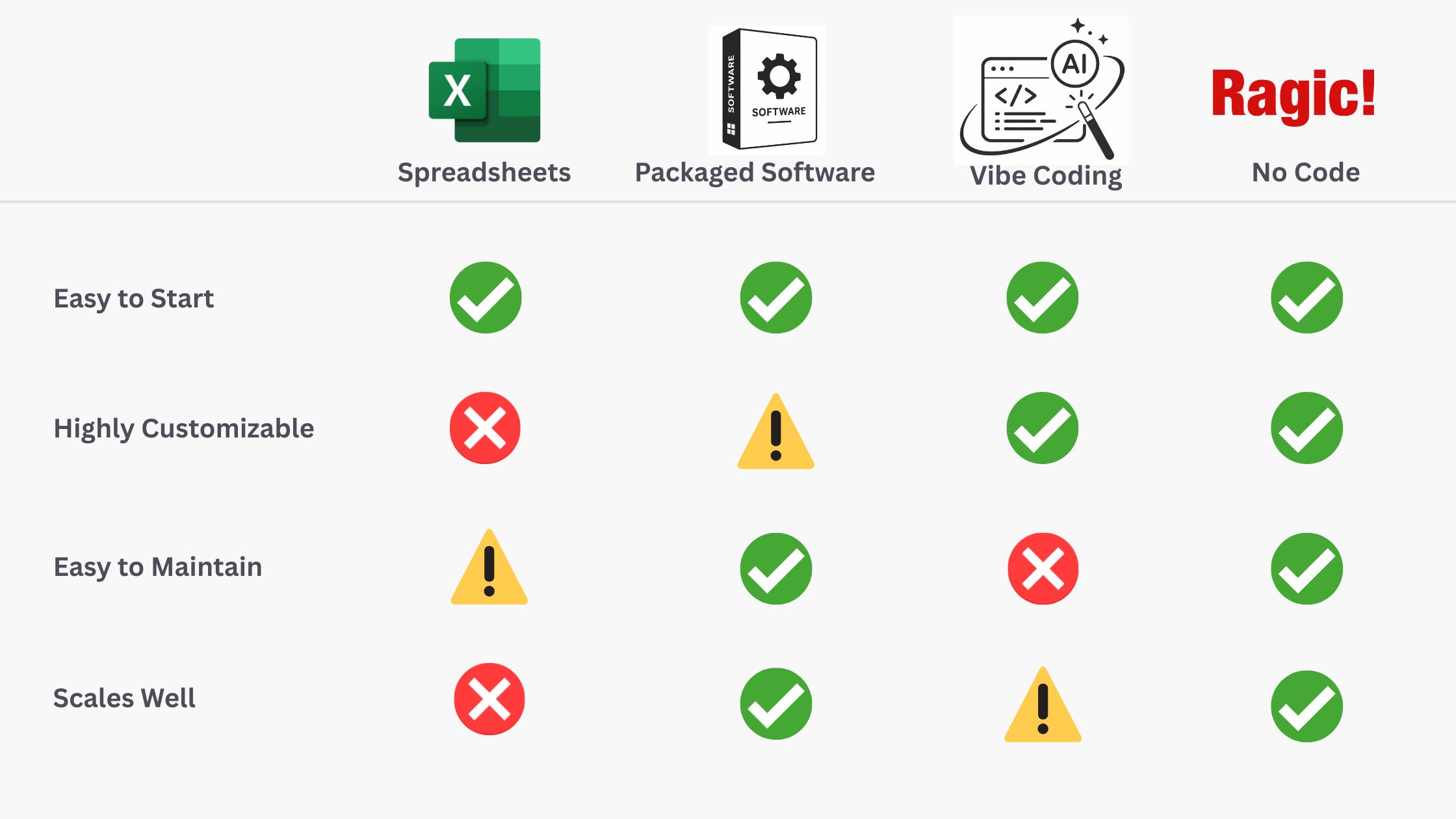
4 Ways to Build a Field Service Management Software
Not every organization needs to invest in a dedicated field service management solution from day one. In fact, many businesses begin with simple tools and gradually adopt more specialized systems as their operations grow. Understanding the strengths and limitations of each approach can help you choose the solution that best fits your organization’s needs.
1. Spreadsheets
For many businesses, Excel or Google Sheets is a natural starting point. They’re familiar, easy to set up, and work well for managing smaller volumes of data. However, as operations expand and more employees begin collaborating, spreadsheets can quickly become difficult to maintain.
Information is often scattered across multiple files, requiring the same data to be entered repeatedly and increasing the risk of duplicate work and inconsistencies. Large spreadsheets also become slower to filter and navigate as data grows, while limited tracking capabilities make it difficult to monitor job progress, approvals, and historical records. Although Google Sheets offers basic version history, spreadsheets generally lack the granular permissions, structured workflows, and data relationships that make field operations easier. Over time, what was once a simple solution can become a bottleneck that limits efficiency and scalability.
2. Ready-Made Software Packages
Many ready-made field service management solutions, such as Jobber and Housecall Pro are designed to help businesses schedule jobs, dispatch technicians, manage customers, and generate invoices. For companies whose operations closely match these standard workflows, these platforms can be a good choice. However, organizations with specialized processes, industry-specific requirements, or complex approval chains may find ready-made software too rigid to accommodate their needs. While some platforms offer configuration options, their core workflows are typically predefined, making it difficult to support highly customized processes without workarounds or additional software.
For example, a vegetation management company may need to record on-site conditions, automatically attach weather conditions to each job, route records through approval stages, and generate customer-specific reports, all within a single workflow. If the software doesn’t support these requirements, teams often end up relying on a combination of spreadsheets, paper forms, or third-party tools to fill the gaps, which further scatters data and reduces efficiency.
3. AI Vibe Coding
As AI technology continues to advance, it has become easier to build custom applications using natural language prompts— a trend often referred to as “vibe coding.” This offers tremendous flexibility to create software tailored to unique workflows. However, unless someone on the team can review and maintain generated code, it can be difficult to identify bugs, security vulnerabilities, or performance issues hidden behind the surface. While the application may work well initially, problems often arise as the system becomes more complex.
Long-term maintenance is another important consideration. Business processes naturally evolve over time, requiring new features, workflow changes, and integrations. Updating an AI-generated application may involve modifying the underlying code or repeatedly prompting AI to regenerate portions of the system, which can unintentionally introduce new issues or break existing functionality. For organizations that depend on their software every day, these maintenance challenges can make AI-generated applications difficult to scale and support over the long term.
4. No Code Tools
No-code platforms offer the best of both ready-made software packages and custom-built applications. Instead of forcing businesses to adapt to predefined workflows or requiring them to maintain code, no-code platforms allow organizations to build software around their existing processes using visual, drag-and-drop tools rather than programming.
This gives businesses the flexibility to customize forms, workflows, approval processes, dashboards, and reports as their operations evolve, without relying on developers for every change. At the same time, they benefit from the stability, security, and ongoing maintenance of a mature software platform, making no-code a more sustainable long-term solution than many AI-generated applications.
For example, Ragic has helped organizations across industries build tailored field management systems. From work order management and inspections to asset tracking and approval workflows, businesses can create applications that fit their unique operations while remaining easy to maintain and scale as their needs grow.

Tips for Designing Field Service Management Systems
Every field operation is different, but the same design principles apply across most industries. When building or choosing a field service management software, keep these best practices in mind:
Built It Without Code
Whether you provide environmental, logistics, or maintenance services, the right system should adapt to your workflow— not the other way around. With a no-code platform like Ragic, you can build a field service management system tailored to your unique processes.
See how organizations across different industries have built their own solutions with Ragic:
Ready to build your own field management service system?

